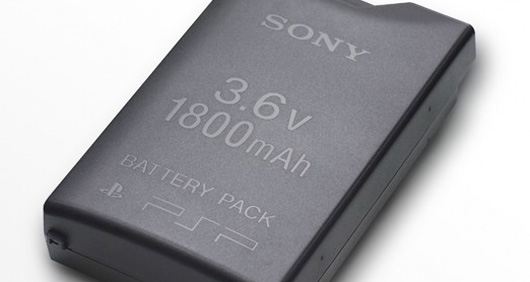
Pandora’s Battery Easy Installer

Posted by x3sphere on August 29, 2007 @ 6:16 pm


Want to create your own Pandora’s Battery but lack the technical know-how? Good news, local developer XsavioR has released an easy to use GUI installer for you. Head on over to the release thread for setup and install instructions.

Download Pandora’s Battery Easy Installer

Read morePandora Installer For 3.X Kernels Revision 2, Pandora Installer For 3.X Kernels, Pandora Installer For 3.X Kernel Revision 3a, Pandora Installer For 3.X Kernel Revision 3b, Pandora Installer For 3.X/4.X Kernel Revision 4a

Comments
Chilly Willy says:

Seems to work just peachy. Only one caveat - in the requirements dialog, it says you need a 32 MB or larger memory stick. It SHOULD say you need any size Pro Duo memory stick less than 8 GB. Most 32 MB sticks are Duo, not Pro Duo, and therefore won't work. Also, 8 GB sticks cannot be used either as Pandora's Battery IPL uses 1.50 firmware derived libs, and 1.50 didn't support 8 GB sticks.

Acerthief says:

It works perfectly XsavioR, but yeah jsut the condition chilly willy mentioned. besides, 32MB isn't enough, i use a 64MB and there's barely any room left.

XsavioR says:

BAh wonder why my stick is reading

Size 14.8 MB
Size on disk 16.2 MB

And thats with the bin's still left there. But As long as the info is here (and at the top) No worries. Sorry for the "typo" by my stats its accurate. I will try it on a 32 MB PRO duo tomorrow and see what I get.

jedsteroo says:

what if i managed to do everything to my 32MB DUO ms and it was a success while following the steps made by x3sphere? will it still work if i put it into a bricked psp?

Chilly Willy says:

Who knows? I know Duo sticks aren't supposed to work, but nothing is ever absolute. The point is you should try to use stuff that is KNOWN to work to avoid potential trouble later. Use a Pro Duo stick instead of Duo. Use a Sony battery instead of something off eBay. Maybe you can "get by" with cheaper non-brand stuff, but we're talking about rescuing your brick PSP here. No need to skimp THAT much. :wink:

x3sphere says:

I don't think it will work... the readme states that only Pro DUO sticks will work. As far as I know, the 32MB bundled in the value pack is only a Duo.

Updated the FAQ with this bit of information too.

jedsteroo says:

Step 22: Type "msinst X msipl.bin" where X is the drive of your PSP. Do not include the colon. For example, my PSP is connected at O:, so I type "msinst O msipl.bin".

You should see a prompt like this. I guarantee that your stuff will be slightly different; it depends on how your computer is set up, what sort of memory stick you have, and so on. As long as you get the "Are You Sure? [Y]" prompt, you know that the msipl.bin file is OK.

>>> C:psppandoramsinst>msinst O msipl.bin
>>> PSP MS IPL Installer
>>> Load IPL code msipl.bin
>>> 241664 bytes(59 block) readed
>>>
>>> Target DRIVE is 7
>>> Check partation Sector
>>> boot status 0x80
>>> start head 0x05
>>> start sec/cyl 0x0004
>>> partation type 0x06
>>> last head 0x0F
>>> last sec/cyl 0xB7E0
>>> abs sector 0x00000810
>>> ttl sector 0x000767F0
>>> signature 0xAA55
>>> Check BPB Sector
>>> signature AA55
>>> Check free reserved sector:OK
>>> Write ABS Sector 0x10 to 0x1E7
>>> Are You Sure ?[Y]


Type 'y'.

>>> y


and you should see

>>> Write MS BOOT CODE


That means that you now have a "magic" memory stick.

You're all set!


therfore it doesn't matter if you saw this bit of info while installing the msipl.bin onto the memory stick 32MB DUO it still won't work? has anyone tried it?

can this Pandora's Battery downgrade any custom firmware to the firmware 1.50 and one more thing, what are the steps to downgrade any unbricked version psp set with eg: firmware 3.50 or even higher? *originally, only lumines can downgrade version 3.50*

x3sphere says:

Yeah it can downgrade 3.50 and higher. Taken from the bottom of the FAQ (these steps apply for both downgrading and unbricking):


As for the 32MB stick, once again the readme states it will only work with PRO DUO and not DUO sticks. So you're taking a gamble there. Haven't tested using a 32MB stick myself though.

Acerthief says:

i tried it. using a 32 duo won't work. at least that's my results. using a duo not PRO duo, downgrading = bricking. unbricking = bricking.

don't know about others, but that's my results.

jedsteroo says:

AcerThief: oooo better don't play with a 32mb DUO then, i don't wanna self-brick or inflict bricking to others. thanks! :)

x3sphere: Works for custom firmware too?

another qns, can we use our "magic stick" as a normal one too meaning it is being formatted and installed with the msipl.bin file to unbrick bricked psp sets as well as putting in our games to play our ISOs/CSOs while not using it for unbricking or is the magic stick strictly for unbricking only?

Acerthief says:

lol i have a 64mb PRO duo for backup, dont worry lol.

yes this works for customfirmwares too if you bricked.

and yes you can still play ISO/CSO on the mem stick as the mspformat.exe only logically formats a space that it needs.

jedsteroo says:

therefore this means you can't downgrade psp sets that are actually working with custom firmwares (not bricked) to 1.50?

Acerthief says:

of course you can, but why even bother that? XD. no offence or anything:)

supaquickt says:

I always like easy, cause I'm a lazy person. I've already got a pandora battery and stick but I'm creating a few more for some people who don't have a custom PSP. So I'll try this out for that. Although I don't really think the guide is hard to follow, but hey the more help the better. So big ups to XsavioR, let you know how it goes.

nhlan7 says:

Hi,

I did all the way to the point where my windows dos shell says:
>>> Write MS BOOT CODE

and quickly disappear by itself, is it normal and suppose to be that way? So I though I was success for making Pandora but when I stuck the memstick + Battery into my friend PSP with 3.50 sony official firmware and it didn't do anything the PSP just boot up as normal. Please help me out, thanks.

x3sphere says:

It's a problem with the battery then. Did you run the battery application on your PSP?

nhlan7 says:

It's known good battery and I have been using this until the day that I tried to convert to Pandora. I used both 3.40 OE and 3.52 M33-4 to make Pandora but none of this was accomplished. I like to comfirm from you that at the step " >>> Write MS BOOT CODE " the windows dos shell disappear or stay unless you're manual close it.

x3sphere says:

Yeah... that's ok. But the thing is: did you run the "battery" application from the Game menu on your PSP? This is what converts the battery to Pandora.

XsavioR says:

Thanks exo , pc is having overheating issues, Couldnt get it to stay running

It sounds like you missed a step somewhere. Perhaps try running the easy installer. Be sure to read the prompts, and do as it says.

It sounds like you:
a. have a battery with NON-writable eeprom,
b. forgot to create the battery using Pandoras battery creator, run from the psp.

This kinda thing was the purpose for the easy installer. try running it. You will be prompted to read the results and verify them b4 continuing

FANTOM92drule says:

can i use this in 3.50

XsavioR says:

3.50 sony firmware? No, I mean you can run the installer, but not the Pandora's Battery creator by Team C+D rendering the installer useless.

Unfortunately you need to have a homebrew enabled PSP inorder to create a
Pandora's Battery. Luckly tons of us have setups, and are willing to work towards downgrading your PSP.

typhoon says:

please help!
i´m becoming this message:

Check free reserved sector: to small reserved sectors
http://img175.imageshack.us/img175/8900/captureni1.jpg

x3sphere says:

Should be noted that you cannot create a Pandora's Battery under Vista. You're getting that error because it did not format the memory stick.

You'll have to use XP.

waddpsw says:

This installer will create the latest version of Pandoras battery ??

I need to make one to downgrade a slim v3.92


Regards

Wad

donsammy says:

it will downgrade any psp
ive use it with slims OF 3.72, ive not done that FW yet

frosty5689 says:

a slim 3.92....-.-? and why are you bumping up old threads.

NYC7633 says:

Hi everyone,
I have a question for XsavioR or anyone else that can help me.
I have a blue psp-1007. I downloaded the "Pandora's Box Easier-Installer by XsavioR" followed the steps carefully, but when I got to Step 4 C,
I went and tried to create the pandora battery and my psp screen went black. It seems like the system is still working but the screen doesn't work. It lites up every minute or so, but when I touch the button the screen goes out.
WHAT DID I DO WRONG??

NYC7633

x3sphere says:

Did you try rebooting the PSP? Converting a battery to Pandora can in no way harm your PSP.

algarete25 says:

XsavioR,...Thanks for meeting me up to unbrick my psp an downgrade my 3.52.
Both working great.Ones at 3.52 M33-4 an the other ones at 3.71 M33-3.Not gonna add XMB thats not ment for that version again(added a 3.52m33-4 xmb to 3.71m33-3 that bricked it)...Just made a Pandoras battery,just incase this happens again.Nice installer

XsavioR says:

Glad i could be of assistance bud. Sorry again to have made u wait so long. atleast i was able to rig something up on the fly. glad u liked the installer .

igor_integra says:

Thanks alot for the guide, but i ran into a little problem. When I get to the step 4 B- create pandora's battery when I try to run the pandora's battery creator from my PSP i get an error code 80020148- Unsupported PRX type. Cans some one please help me. i got no clue what im doing wrong. PS. Im running on a fat PSP 3.71 M33-3, im trying with a 2gig and stock SONY battery 1800mAh

x3sphere says:

This installer won't work on 3.71 M33... I recommend you follow the manual guide:

http://forums.exophase.com/showthread.php?t=3780

10 akeem says:

:smile:plz i need help on step 4 i am new to this

10 akeem says:

i really need help on this sep 4 doesnt work

10 akeem says:

:confused1:
wen i put in the battery nun thing happens

XsavioR says:

give me a bit , im looking into it , been hella busy

jf1093 says:

help! everything works up until I have to run PAndora's Battery Creator. then i get
"The game could not be started (80020148)"
WHAT DO I DO?

I have 3.90m33-3

x3sphere says:

This doesn't work on 3.90 M33-3. You'll have to follow the manual installation guide:

http://forums.exophase.com/showthread.php?t=3780

jefskie says:

can i use this Pandora's Easy Installer to a PSP SLIM TA-085v2 board? THANKS!

x3sphere says:

You can use an already created Panora battery + magic memory stick on a TA-085 v2 PSP but for actually converting the battery, no. There is no way to convert a battery to Pandora on that motherboard.

mark1990 says:

i followed the instuctions and whenever i tried to run pandora on my psp the file wasent there i have a 2gb pro duo with firmwear 5.02 any help would be gratefull

Khor says:

Ello i want to know i have an new Psp but i Update it to 5.3 -_-' can i Pirate It !?!? did they have an Way ?

Khor says:

Ps: i have an stick 4 go

alex_e says:

use the hen.
its only for 5.03, check the front page.

you say:

Login with your username and password below. New User?


ss_blog_claim=bf55edcce6ff2f078693a24c8876e229