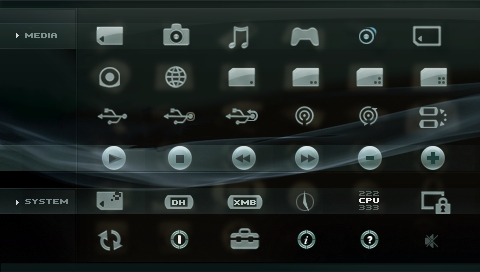
iR Shell 4.8

Posted by x3sphere at November 17, 2008, 1:35 pm


Following a riveting comeback earlier last week, homebrew developer AhMan today released an update to his popular multi-purpose PSP shell replacement, iR Shell. The full changelog can be found past the break, detailing various bug fixes as well as enhancements aimed at making use of the extra memory found in PSP Slim units.

New Features for PSP Slim:

- Added support to homebrews that are built with the option PSP_LARGE_MEMORY, that is, to use the extra slim memory. When running these homebrews under iR Shell, they will have access to another 26MB slim RAM. Pls note 2MB of slim RAM is reserved for iR Shell.
- Enhance the HTML Viewer (originally developed by Dark_AleX) to use the extra slim memory. These should help to reduce “Not enough memory” message when accessing larger web contents. The HTML Viewer can be accessed via predefined homebrew #1 icon.

Bug Fixes:

- Some homebrews weren’t correctly recognized by iR Shell and application names were displayed as garbage.
- When setting np9660 mode in iR Configurator, some homebrews failed to launch.
- Launching PS1 games via popsloader wasn’t working properly.
- Copying a large file from ms0: to nethost0: will crash the system.

Note that version 4.8 of iR Shell is supplied as an update only. That means you will need to have the previous 4.7 release installed. Download links for both versions are provided below.

Download iR Shell 4.8 / iR Shell 4.7

iR Shell 4.8 Released [iR Shell]

Read moreiR Shell 4.9, iR Shell 3.8, iR Shell 5.0 Released, Ushers In Advanced Multi-Tasking Capabilities, iR Shell 3.81, iR Shell 3.62 Update

Comments

Ranelar says:

So... as someone who fairly recently joined the psp homebrew community, what is the main point to iR Shell? I assume it would be nice to have my slim's extra memory being used for emulators, but I'm sure there's a lot more to it than that?

Jake says:

You can think of it as a replacement for the xmb. It has a built in file browser and can launch games and play media, it can access media/games on your computer via usb or wireless. It does all this and more!!!:biggrin:

Ranelar says:

Is playing games over wireless worthwhile, or is it too laggy? Is playing over usb just as fast as playing on your memory card? Why would you need a file browser? The only time I need to browse my files is when I'm connected to my PC in order to move things on/off my memory card, why would you need it when not connected to a PC? Or can you move files over wireless as well?


Sorry, lots of questions :P

Jake says:

Ive played games over wifi and apart from a lag at the start they played fine, although some wouldnt start. I havent really played games over usb so I cant vouch for that. You can browse your memory stick or the computer youve connected to with usb or wifi and copy, rename, delete, etc files and folders on and between the connections. You can copy files over wifi but it isnt the fastest way to do it.

The best way to find out about would be to install it and find out for yourself.:biggrin:

Ranelar says:

thanks, I guess I'll try it out :P

Jayz-28 says:

Hi there. I have an ir shell in my psp but i cant use it as a remote for my tv. When i open the ir remote view option in the ir shell theres only two sub option that is showing it's panasonic tv and pentax optio. my tv is a sony tv. can somebody please help me how to use my psp to my tv?? and how can i update my ir shell version 4.7 to version 4.8?? im a noob so please do help me thanks

Jayz-28 says:

guys about my previous post. don't mind it. i can use my psp as a remote right now... thanks anyways....

you say:

Login with your username and password below. New User?


ss_blog_claim=bf55edcce6ff2f078693a24c8876e229