iR Shell 3.9 Released

Posted by x3sphere at January 28, 2008, 11:06 am


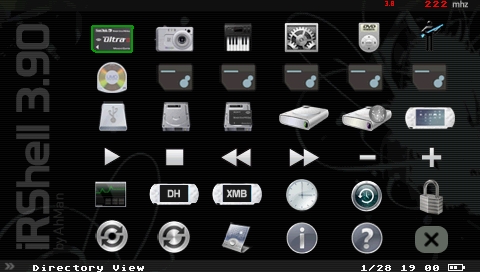
Homebrew developer AhMan has announced the final release of iR Shell, a multi-tasking shell application for the PSP. iR Shell brings additional functionality to the PSP such as the ability to play two-player PSOne games via ad-hoc and playback MP3 files while in-game. Now at version 3.9, the latest release is fully compatible with custom firmware 3.80 M33-5 and 3.80 M33 popsloader v2.

Hit the jump for the full changelog.

New Features:

* Added support for 3.80M33-2, M33-4 & M33-5. Pls note M33-1 & M33-3 are not supported due to some technical issues which I’m lazy to resolve.
* Added support for 3.80 Popsloader Version 2. Version 1 isn’t supported.
* The 1.5 Kernel Addon for 3.71M33 & 3.80M33 has caused some incompatibility issues with fw 1.5 iR Shell. This is now resolved.
* Enhance PSP ISO compatability. Previously failed ISOs will probably work in this release.
* For slim only, the nethostfs MAX mode is now compatible with WPA.
* Some older firmware supports have been removed to reduce the distribution archive. This version has support for fw 1.5, 3.10 to 3.80. Also, directories EXTAPP15 & EXTAPP3X have been combined into a single EXTAPP to save space. Each APP# directory has 2 EBOOTs, with EBOOT.PBP for fw 3.x and EBOOT15.PBP for fw 1.5.

Download iR Shell 3.9

Thanks Fadil for the tip!

iR Shell 3.9 Released [AhMan]

Read moreiR Shell 3.7, Universal Popsloader Released, iR Shell 3.81.1, iR Shell 4.7: 5.00 M33 Compatibility, Revamped iR Sensor, Update: PSP Custom Firmware 3.71 M33-4 Released, Popsloader Bug Fix

Comments

nevster says:

been looking forward to this thanks guys... installed it like the faq told me to and i've run into a problem, i enabled the pugin through recovery and restarted, and then it boots up and restarts after the psp logo, and the does the same until i turn it off completly or hold triangle to boot to the xmb..

nevster says:

oh and incase it helps im running 3.80 m33-5 with the 1.50 addon

thanks

RJC4LIFE says:

I can't remember exactly but I think you have to run the patch under 380 to use the autoboot prx..I may be wrong so hold off on that until someone more knowledgeable replies..(although I'm thinking the patch is only for booting btween the 3x and 150 versions of Irshell automatically)

Again, someone will reply..

nevster says:

sorted it noworrys... had to delete some stuff to get all my files on the ms... one more question tho, where can i find this "Pronto Codes infrared device codes pack" to make the remote work please

x3sphere says:

The pronto codes came with an earlier release of iR Shell. You can get them here:

http://exophase.com/files/psp/prontocodes13.zip

frosty5689 says:

Iono if it's just me, but none of the no umd mode work...

chemist says:

too bad its the final release of irshell. :(

nevster says:

my no umd doesnt work either, i just go back to xmb to run iso's other wise if in irshell it boots the umd and not the iso... found the files thanks x3sphere, bumer tho, 2000 files and none of them work my digibox or telly lol oh well

yoitsben says:

nevster what did you delete exactly, I am having the same problem.

frisomel says:

does this work on 3.90 M33?

nevster says:

only some games mate nothing to do with irshell, why's that you having problems?

i've deleted it now, excellent program tho, but couldn't get alot of the features to work for me like the remote and my iso's to run on their own or with a umd, only the umd itself would run.

EeveeXIII says:

God if it isn't one problem its another....Irshell is asking for a umd for homebrew. it has never previously done that before and when i put a umd in, it plays the umd...any thoughts on how to resolve this problem

nevster says:

thats the problem i had, i had to go back to the original xmb to use mine so i deleted it cos i couldnt find a way to do it lol got stressed

EeveeXIII says:

yeah lol its pretty irritating...but i can still use the ir remote which is helpful...since i lost the remote to my tv a long while ago hahaha

roe-ur-boat says:

Go into the IRShell configurator and change the UMD mode to "Sony NP9660 NoUMD Mode"

RJC4LIFE says:

That doesn't always work,if at all.Whenever I select that option or the M33 driver Irshell asks for a UMD..

EeveeXIII says:

same here...

mercury_01 says:

Hey, I have the last version, and am not planning on updating, but where can I get that skin you have up there? that's the best looking skin Ive seen yet.

you say:

Login with your username and password below. New User?


ss_blog_claim=bf55edcce6ff2f078693a24c8876e229