Cross Extended v1.0

Posted by x3sphere at August 5, 2008, 7:49 pm


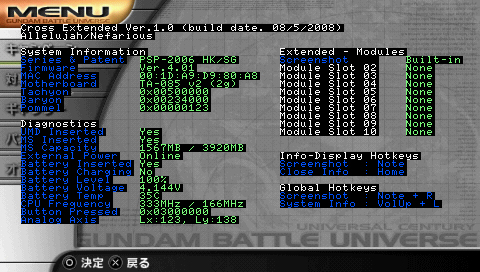
Homebrew developer Nefarious has released a new custom firmware plugin dubbed “Cross Extended,” which displays detailed system information to users regarding their PSP. As shown in the above screen capture, information covered includes the motherboard type, battery voltage, and installed plugin modules.

Once installed, the plugin can be accessed while running a game or in the XMB. Additionally, it is possible to take a screenshot of the system information screen by pressing Note + R. Further details and installation instructions can be found in the included readme file.

Download Cross Extended v1.0

Release Thread

Read moreCross Extended v1.1, Cross Extended v1.2, Screenshot Plugin For 3.71 M33, FuSa “Screenshoot” Plugin Released, PSPStates Experimental v2, Savestate Plugin For 4.01 M33

Comments

silver_surfer says:

@ Nefarious: thanks for sharing your nifty homebrew! :smile:

edit: I noticed it can only detect 4G memory stick

x3sphere says:

Nice release :)

Nefarious says:

I see, i'll be updating this plugin soon. thanks for the feedback:smile:

I've also found a bug when using it in a homebrew app causing strange control. so to prevent that please limit the use of this plugin to XMB only,

Just for now.

aero125 says:

Yup, detected 4G instead of the 8G I have. Otherwise sweet.:smile:

x_fox81 says:

Nice!! Awaiting for the updated version!! Dont wanna brick my device up... haha!! :tongue_smilie:

Illegal Machine says:

Yep... Same here.. Showed my 16 GB card as 4


other than that.. I'd like to see something that allows us to customize the hotkeys


and ditch the screenshot feature... I already have that on Red Squirrels extender plugin

Nefarious says:

Right now i'm in search to resolve that limitation (MS > 4Gb) but to no avail.
Can someone with memorystick 8Gb ~ greater upload their screenshot, just
the diagnostics portion is enough.

That may help me on how to atleast display the info in proper form.

Thanks:smile:

silver_surfer says:

@ Nefarious:

here's a screenshot by the way i'm using Genuine Sony 16G Mark 2

http://img127.imageshack.us/img127/8871/snap000eeb0.png

Nefarious says:

Thanks silver_surfer:smile:

Btw, does the 326MB free space expected ?

silver_surfer says:

@ Nefarious:

yes bro 326MB space left from my 16G

Nefarious says:

I see

If Insert_witty_name from PS2Dev is correct, then i can deliver ver 1.1 soon enough.

I've prepared ver 1.1 here http://forums.exophase.com/showthread.php?t=8429
which displays extra information about the Memory Stick for test purposes only and
will be removed when officially released.


Thanks again, since I only have 4Gb Memory Stick here :sad:

silver_surfer says:

@ Nefarious:

new screenshot using the beta version

http://img160.imageshack.us/img160/3782/snap000yp2.png

Nefarious says:

Those new MS parameters displayed is the correct one.


With this, I have confirmed that its just what Insert_witty_name said. thank you very
much silver_surfer. I'll finish it this day and make a release to correct memory stick
actual size computations.

Nefarious says:

Here we go, I've updated the files here http://forums.exophase.com/showthread.php?t=8429 and solved the Memory Stick issue :smile:

silver_surfer says:

@ Nefarious:

it's all working now thanks for the update.. :wink:

nigel001 says:

i need help i was trying 2 up date my psp slim with a m33 4.01 update but wen it reach 92% it stopped and the light only comes on 4 a short time can it be fixed and how ??????

Phreaker47 says:

Hey Nefarious, nice plugin. Just registered here to also report your 1.1 version won't run on my TA-088 (v1 I believe). I should also note I'm using a 8GB lexar platinum II stick. 1.0 does work fine (minus the capacity reporting of course.)

you say:

Login with your username and password below. New User?


ss_blog_claim=bf55edcce6ff2f078693a24c8876e229