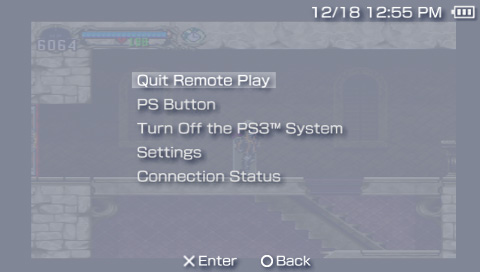
Now Play PSOne Games Over Remote Play On PSP

by Mike Bendel on December 18, 2007 @ 10:31 am


Update: RJC4LIFE has reported that playing PSOne games via Remote Play also works with firmware 3.71. So as long as your PS3 is updated to 2.10, you can take advantage of this functionality even on a homebrew capable PSP.

According to various posts over at the official PlayStation forums, PSP firmware 3.80 and PS3 firmware 2.10 have silently added new functionality to allow users to play PS Store-bought PSOne games and original PSOne game discs on the PSP through Remote Play.

The Unofficial PS3/PSP Remote Play Thread [PlayStation]

Follow this author on .

Read morePSP Firmware 3.95 Now Available, Features Customizable Controls For PSOne TitlesBionic Commando Rearmed Playable On PSP Via Remote PlayKoller Promises More PSOne Titles Are On The WayClip: Native PSP Store In ActionSony Considers PSN Subscriptions

Comments
porchemasi says:

Damn! Wish it was the other way around >:( it would be sweet to run PS1 isos on PS3 :p DAX just say the word ull work on PS3 dev and im sure we can all pitch in $20 for u to buy a PS3 ! :)

porchemasi says:

You can be the 1st to conquer a next gen system :)

RJC4LIFE says:

I'm doing this in 371 M33 even though you're post says it's via 380....what was wierd is that when I disabled the remote connection in the PSP the PS3 stayed at the "Connect PSP via Remote Play" screen and when I re-connected I was still exactly where I was in the game before the disconnect, kinda cool I guess..although slow and buggy..

I used the Alernative VSH Menu plugin for the screenshot.Could someone post the attachment shot here for me? Imageshack is being a brat...

Now to figure out how to change my Psone eboot exstentions from Jpeg's...then move them to my PS3's game folder...cause my PS3 is chock full of Psone games..

x3sphere says:

Cool... thanks for the info. I'll add it to the first post.

RJC4LIFE says:

Something great is going to come from this....

porchemasi says:

This is either a lie or does not work only for me!

When i go to remote play on my PSP on 3.71 M33 it says there is an update for the PSP and wont let me continue..... so im pretty sure what u said "RJC4LIFE has reported that playing PSOne games via Remote Play also works with firmware 3.71."

is a lie ....

x3sphere says:

What update is it asking for? Seems to be working for some people but I think it's because they already had replaced premo_plugin.rco and premo_plugin.prx with 3.72 modules.

porchemasi says:

can u mention on the site how to do this? or is it better just to wait for 3.8 M33?

x3sphere says:

Download PSARDumper:

http://exophase.com/files/psp/M33_NEWPSARDUMPER.zip

Copy the newpsardumper folder to PSP/GAME

Then download the 3.72 update (I don't have a link to this, and Sony link is now dead). Copy the update named as EBOOT.PBP to your memory stick root (i.e. X:/)

Run PSARDumper and follow the on screen prompt to dump files as decrypted. Now connect your PSP via USB and you should see an "F0" folder on the memory stick.

Inside the "F0" folder, copy and save premo_plugin.prx (vsh\module) and premo_plugin.rco (vsh\resource).

Finally, boot up your PSP in recovery mode and go to Advanced -> Toggle Flash0 (make sure USB cord is connected). Then copy the saved premo_plugin.prx to vsh\module and premo_plugin.rco to vsh\resource. You'll be asked to overwrite each file, hit yes.

That's it... should work now.

porchemasi says:

wow it worked !! sweet!!

FF7 runs perfect!! wowwww niceeeee

I hope the 40gb ps3s that have cut out PS2 emulation doesnt stop sony from making PS2 Remote Play ... i mean its just streaming video .. and sendign back inputs ...

RJC4LIFE says:

Sorry bout that, I forgot to mention the 372 bit..(I just assumed anyone in the know..well..knew)

you say:

Login with your username and password below. New User?


Quantcast